Project Context
This project focuses on the analysis and optimization of the quantitative user experience (UX) of an existing website dedicated to textile materials. The main goal was to understand how users interact with the website and to use data-driven insights to identify usability issues and improvement opportunities.
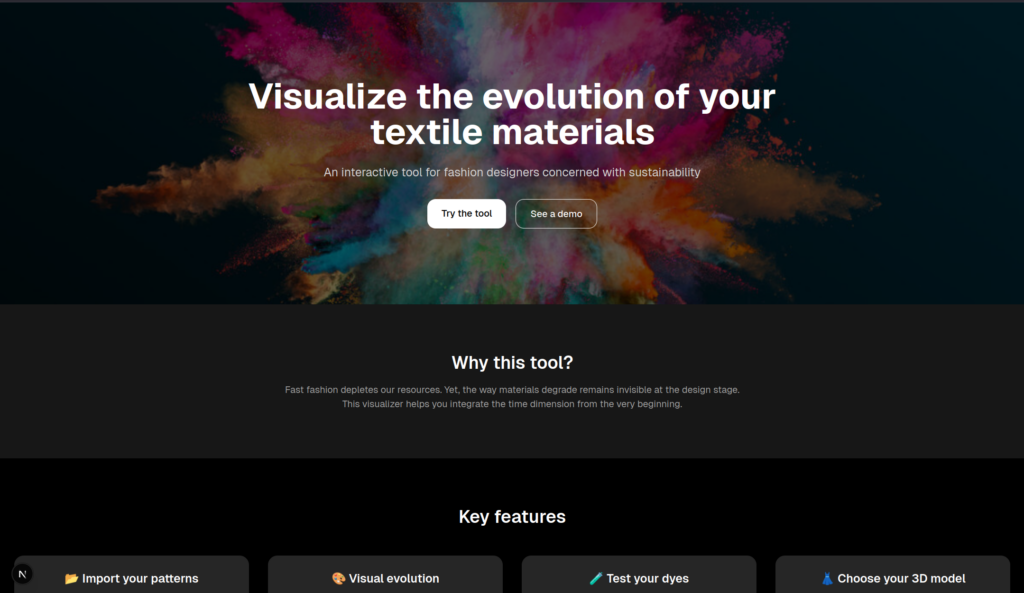
The site’s goal is to predict how some textiles age. The website already existed but did not include tools to collect data about real user interactions. As a result, the website owner had limited visibility on how users navigated through the pages, which features were used, and which elements caused difficulties.
The main issue addressed in this project was the lack of quantitative data related to user behavior. Without measurable indicators such as button clicks, page access, or navigation paths, it is difficult to evaluate the effectiveness of the website or to improve the user experience in a relevant way.
Additionally, some pages or s were partially inaccessible or underused, which reduced the overall usability and clarity of the website.
Finally we have to understand how the site works t in the application of textile but also how it was coded.
Project Objectives
The objective of this project was to enable the website owner to:
Collect and store user interaction data
Analyze how users interact with different pages
Identify usability issues and non-functional elements
Identify non-functional elements and areas for improvement
Better understand user behavior
Note some futur improvements
General Approach
We first took time to explore and understand the existing website, including its structure and source code. The website was developed using Next.js, which required us to learn how this framework works and how to integrate new features into it.
As students in cybersecurity and embedded systems, we have stronger technical and programming skills than experience in user interface or interaction design. Therefore, our approach focused more on technical solutions for data collection and analysis, which aligned well with our background.
The website was developed using Next.js, which required learning how to integrate tracking mechanisms into the existing architecture. We connected the click counters to a MariaDB database, ensuring that each interaction was stored with relevant information such as the page and the type of action. Additional buttons were added to allow access to previously inaccessible pages, improving navigation and visibility of content.
Methods
Website Analysis and Handling
We first took the website in hand to understand its structure, functionalities, and limitations. This included exploring the different pages, identifying inaccessible or unused sections, and analyzing the source code.
We cloned the website’s Git repository to explore all the available pages and test the site thoroughly. During this phase, we identified several areas for improvement and developed a protocol for collecting user data.
As requested, we started by creating a survey based on existing UX questionnaires, which we then adapted to the specific context of the website.
After, we established a protocol to collect data on button clicks while fully respecting user data privacy.
Data Collection Protocol
To ensure reliable and ethical collection of quantitative UX data, a structured data collection protocol was defined and implemented. This protocol describes how user interactions are captured while respecting privacy and ensuring data consistency.
User Consent
The first step of the protocol concerns user consent. During the user’s first visit to the website, a pop-up (banner or modal) is displayed to clearly explain the data collection process. This message specifies what type of data is collected, such as user interactions, timestamps, navigation paths, and basic performance metrics. It also explains why this data is collected, namely to improve the user experience of the website, and indicates the data retention period.
The user is given the option to accept or refuse data collection. As long as consent has not been given, no interaction data is recorded. Once the user makes a choice, it is stored locally using localStorage or cookies, in order to avoid displaying the consent request again on every page load.
This step ensures transparency and provides a clear trigger marking the beginning of a data collection session only after explicit user approval.
Session Start and Anonymization
When the user accepts data collection, a new session is initiated. At this moment, a session timer is started and an anonymous session identifier (UUID) is generated. This identifier is stored client-side using sessionStorage, ensuring that it remains stable throughout the entire browsing session but is removed once the session ends.
All events sent to the server are linked to this anonymous session identifier and contain only non-personal information, such as the type of event, the time of occurrence, the page or route, and optional metadata (for example, a button identifier).
An initial idea was to use the user’s IP address to identify sessions. However, IP addresses can quickly be considered personal data and raise legal and compliance issues. For this reason, IP addresses are not used as identifiers for UX analysis. If collected at all, they are only used server-side for technical purposes.
This approach ensures that each interaction can be linked to a single session without collecting personal identifiers such as names or email addresses.
Interaction Instrumentation (Counters and Timecodes)
Once the session is active, user interactions are instrumented using a standardized tracking system. This system records key actions such as clicks on buttons and links, as well as navigation events like route or page changes.
Each recorded event includes a time reference, either as an absolute timestamp (ISO format) or as a relative time elapsed since the user gave consent. This makes it possible to analyze not only what actions were performed, but also when they occurred during the session.
For button interactions, a stable identifier is used to distinguish each element, along with contextual information such as the current page or feature. This level of detail allows precise tracking of user behavior across different parts of the website.
The expected outcome of this step is the ability to reconstruct a complete timeline of user actions for each session and to generate meaningful quantitative UX metrics.
Centralized Storage

All interaction events are sent to a centralized Node.js API and stored in a database. Each event record contains essential fields such as the session identifier, event type, timestamp, route, and additional metadata stored in JSON format.
A simple data management policy is defined to control how long the data is kept and how it can be removed. This includes a predefined retention period (for example, 30 or 90 days) and the possibility to delete data upon request.
Centralizing the data in this way produces a structured and exploitable dataset that can be used for further analysis, such as dashboards, statistics, or CSV exports, supporting long-term UX improvement.
Finally to collect quantitative UX data, we implemented:
Click counters on key buttons and navigation elements
Pop-ups linked to button interactions
A UX survey to collect direct user feedback
A dedicated button to access the survey easily from the website
And each button interaction was recorded and sent to a MariaDB database, allowing long-term storage and analysis of usage data.
Results
Understanding of the purpose
Participants were Telecom Paris students and not texile industry professional, which is the target of the website. It caused some misundestanding of the tasks. Only a third of the participant declared to understand the point of the website, with some of them being wrong. They taught that its purpose was to realise the design of a t-shirt.
8 out of 11 participant reported that the website lacked of explaination, that didn’t help their lack of understanding. Especially with the task involving dyes, which is the part the less intuitive to use.
Usability:
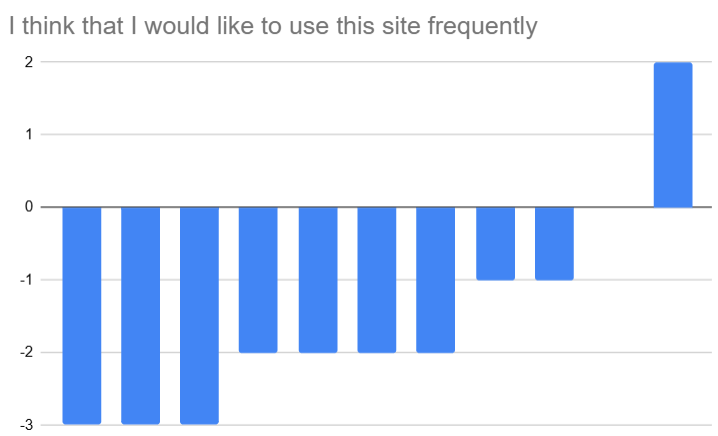
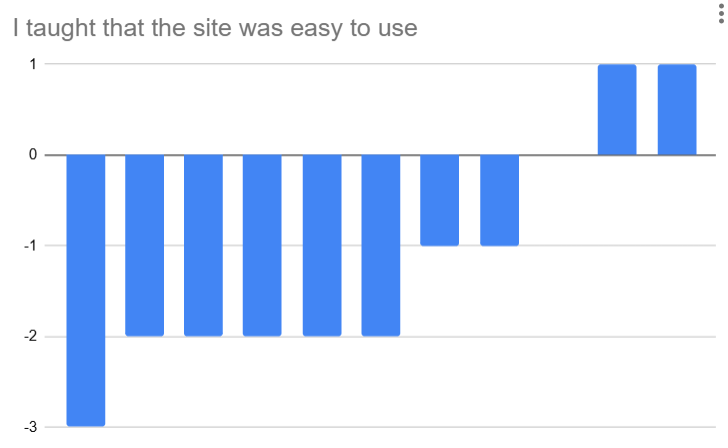
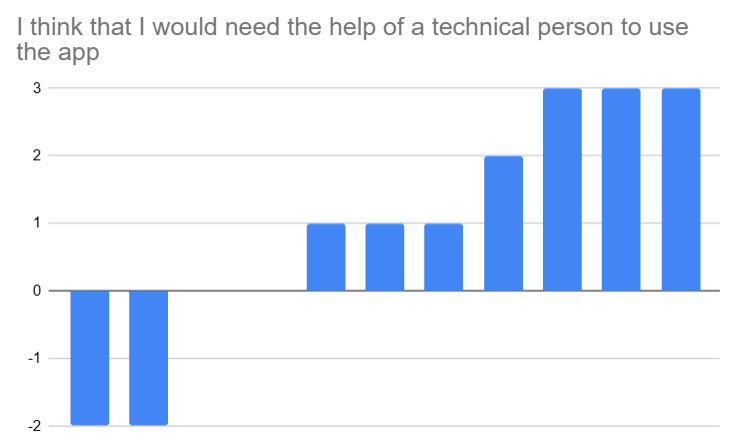
The result is that the website was found too hard to use and not inuitive enough. Some additional explaination would help the users. To make the same test with textile industry professional may reveal different datas.
Clicks
Clicks also revealed some issues on the website. Some buttons are laggy, and are often clicked on several times before to take action. That’s something that was also reported on the surveys.
Insights
We dealt with the importance of combining quantitative data with user feedback to improve the overall user experience.
Indeed, the collected data revealed several important insights. If some pages are rarely accessed, indicating navigation or visibility issues; certain buttons are frequently clicked, showing key points of interest; user feedback from the survey helps identify usability problems not visible through click data alone; …
Conclusion
This project successfully introduced quantitative UX analysis tools into an existing website. By collecting and analyzing user interaction data, the website owner now has the ability to continuously improve the site based on real usage rather than assumptions. The tests reavealed that it was needed, and it will help to improve the website.